
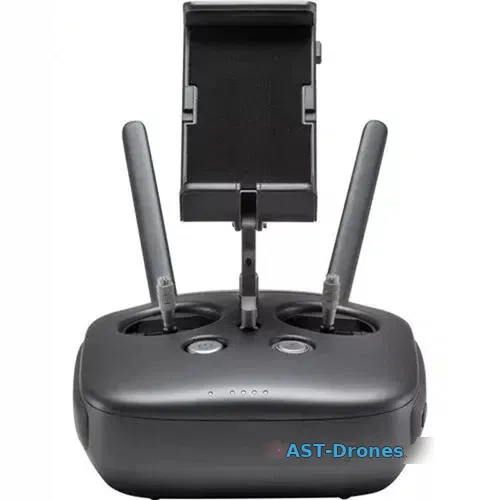
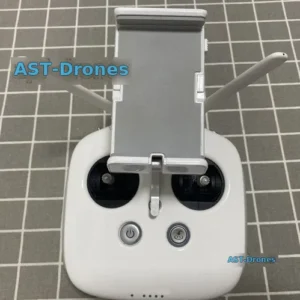
DJI Phantom 4 Pro Transmitter Remote Controller GL300F – Obsidian Edition. Available at AST-Drones for $83.98 with fast worldwide shipping. Every unit is inspected by our drone technicians before dispatch.
What’s in the Box
- DJI GL300F Remote Controller Obsidian Edition x 1
- You need to setup in DJI GO 4 APP to connect to the drone,here is the step:
- In the advanced settings of DJI GO 4, select the corresponding model, restart the remote controller, then you can start to link to the drone.
- 1. After selecting the aircraft type in the advanced settings of the remote control bai of the DJI GO 4 App, restart the remote control, turn on the aircraft, and click “Remote Control Linking” in the remote control settings;
- 2. When the indicator light of the remote control flashes blue and sounds “DDD…”, after pressing the link button on the aircraft with a needle, a red light flashes at the button, indicating that it is linking;
- 3. The indicator light of the remote control turns to steady green and the sound of “DDD…” stops, indicating that the linking is successful.
Specifications
| Operating Frequency | 2.400 – 2.483 GHz and 5.725 – 5.825 GHz |
|---|---|
| FCC | 4.3 mi (7 km) |
| SRRC | 2.5 mi (4 km) |
| FCC | 4.3 mi (7 km) |
| SRRC | 3.1 mi (5 km) |
| Operating Temperature Range | 32° to 104°F (0° to 40°C) |
| Battery | 6000 mAh LiPo 2S |
| FCC | 26 dBm |
| SRRC | 20 dBm |
| MIC | 17 dBm |
| FCC | 28 dBm |
| SRRC | 20 dBm |
| MIC | – |
| Operating Current/Voltage | 1.2 A@7.4 V |
| Video Output Port | USB |
| Mobile Device Holder | Tablets and smart phones |
- Max Transmission Distance:
- 2.400 – 2.483 GHz (Unobstructed, free of interference)
- CE: 2.2 mi (3.5 km)
- 5.725 – 5.825 GHz (Unobstructed, free of interference)
- CE: 1.2 mi (2 km)
- Transmitter Power (EIRP):
- 2.400 – 2.483 GHz
- CE: 17 dBm
- 5.725 – 5.825 GHz
- CE: 14 dBm
Frequently Asked Questions
What is included with the DJI Phantom 4 Pro Transmitter Remote Controller GL300F – Obsidian Edition?
The package includes: DJI GL300F Remote Controller Obsidian Edition x 1, You need to setup in DJI GO 4 APP to connect to the drone,here is the step:, In the advanced settings of DJI GO 4, select the corresponding model, restart the remote controller, then you can start to link to the drone., 1. After selecting the aircraft type in the advanced settings of the remote control bai of the DJI GO 4 App, restart the remote control, turn on the aircraft, and click “Remote Control Linking” in the remote control settings;, 2. When the indicator light of the remote control flashes blue and sounds “DDD…”, after pressing the link button on the aircraft with a needle, a red light flashes at the button, indicating that it is linking;, 3. The indicator light of the remote control turns to steady green and the sound of “DDD…” stops, indicating that the linking is successful..
How long does shipping take for the DJI Phantom 4 Pro Transmitter Remote Controller GL300F – Obsidian Edition?
Orders are processed within 1-2 business days. Delivery typically takes 7-14 days to the US and Europe with tracking provided.
Does the DJI Phantom 4 Pro Transmitter Remote Controller GL300F – Obsidian Edition come with a warranty?
Yes. All products at AST-Drones are covered by our after-sales support. Contact info@ast-drones.com for any issue and we will make it right.
AST-Drones — certified used & refurbished drones with 27-point inspection and 12-month warranty. Questions? Email info@ast-drones.com.
AST-Drones — certified used & refurbished drones with 27-point inspection and 12-month warranty. Questions? Email info@ast-drones.com.
Be the first to review “DJI Phantom 4 Pro Transmitter Remote Controller GL300F – Obsidian Edition”
Related products

Drone - Phantom
DJI Phantom 4/4 Pro/Advanced Battery & Remote Controller Charger

Drone - Phantom
Genuine DJI Phantom 4 Transmitter Remote Controller – GL300C
Drone - Phantom
DJI Phantom 4 Pro V2.0 Transmitter Remote Controller – GL300L

Drone - Phantom


Reviews
There are no reviews yet.